The Problem: Estimation Bottlenecks That Kill Productivity
Let’s get real. Estimation is a grind. If you’re in preconstruction, you’ve felt it firsthand—40-hour takeoffs, flipping through 2,000-page rate books, rebuilding Excel workbooks every time a scope changes. It’s not just tedious, it’s expensive. Multiply that across five GMP pursuits in a year, and you’re bleeding hundreds of hours.
But here’s the kicker: most of this work isn’t strategic. It’s grunt work. Quantity takeoffs, rate lookups, vendor quote normalization—tasks that don’t need a senior estimator’s judgment but still eat up their time. Why? Because until recently, there wasn’t another way.
Well, now there is. AI-powered estimation tools like EstimateNext are shifting how preconstruction teams handle this bottleneck. Let’s break it down.
The AI Fix: 10 Minutes vs. 40 Hours
Take quantity takeoffs, for example. Traditionally, this is a two-day job for two estimators. You’re calibrating PDF drawings, tracing wall lengths, counting fixtures, and double-checking everything. It’s slow, prone to error, and—let’s be honest—frustrating.
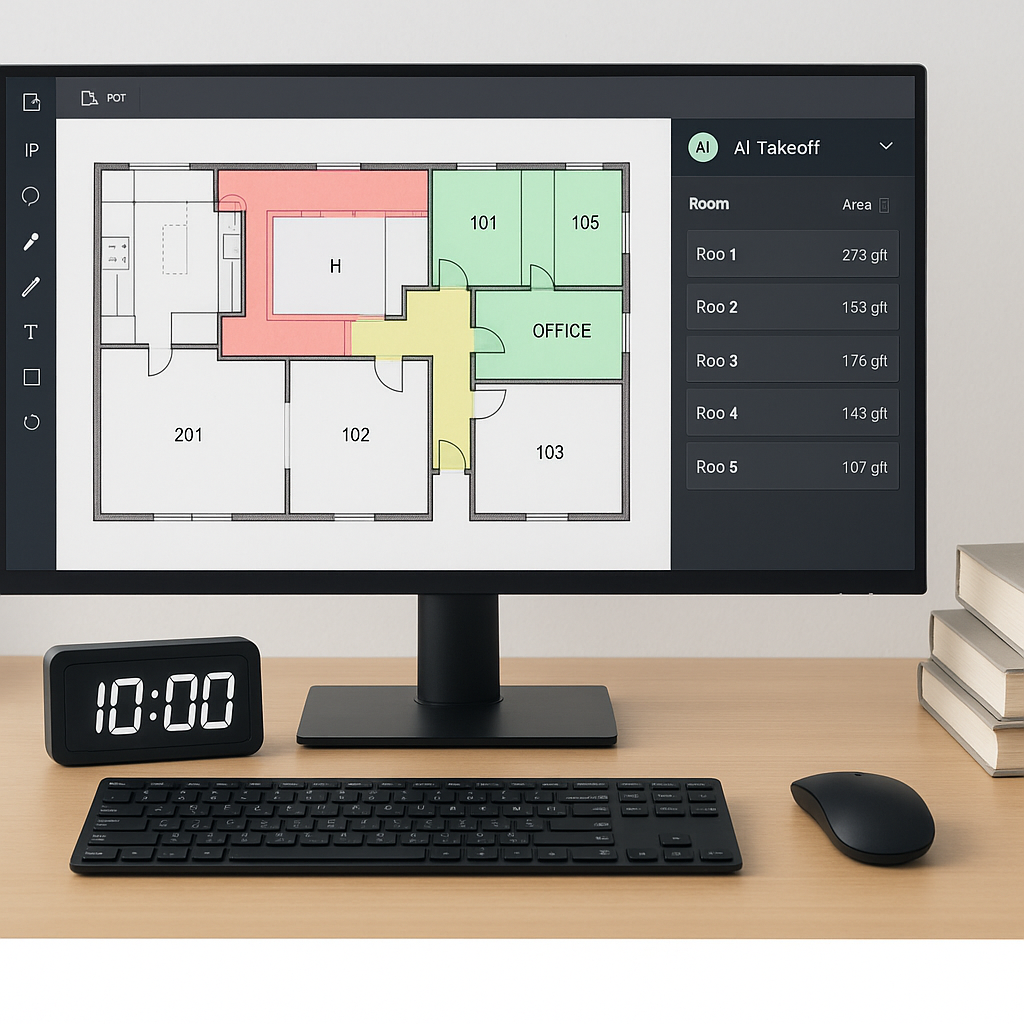
Enter AI. Tools like EstimateNext’s Vision AI extract quantities from drawings in under 10 minutes. Rooms, walls, windows, doors—it reads the entire drawing set and spits out a detailed QTO. Need to remeasure low-confidence lines? You can override them manually with a full audit trail.
Real-World Example: High-Rise Project Savings
A mid-sized general contractor shared their experience in a recent case study: they saved 120 hours on a single high-rise bid by automating takeoffs. That’s two full weeks of labor costs avoided, all while meeting a tight deadline.
What Could You Do With Saved Time?
Imagine what you could do with those 36 hours saved per estimate:
- Bid on more projects, increasing your chances of winning work.
- Spend more time refining your pricing strategy and risk analysis.
- Focus on improving internal processes that often get deferred.
For many contractors, these time savings aren’t just about productivity—they’re about staying competitive in a market where speed often wins the day.
Beyond Speed: Why Accuracy Matters
You might be thinking, “Sure, AI is fast, but can it match the accuracy of manual work?” Fair question. The answer is yes—with a caveat.
How AI Ensures Accuracy
AI tools like EstimateNext aren’t just guessing. They’re trained on thousands of past projects, which means they’ve seen every quirk and edge case imaginable. They also include confidence scoring, so you know exactly where to focus your review. Got custom rates? Upload them. Got a unique scope? Train the AI by rejecting mismatches—it learns as you go. Most users report significant accuracy improvements by their third project.
The Expert’s Role: Amplifying, Not Replacing
But here’s the thing: AI doesn’t replace your expertise; it amplifies it. You’re still making the judgment calls, setting markups, and negotiating with subs. The AI just handles the grunt work. In my view, that’s a win-win.
Case Study: Reducing Errors in Civil Projects
A civil contractor in Texas found that by their sixth project using AI, errors in their QTOs dropped by 42%. This wasn’t because the AI was perfect—it was because they used its confidence scoring to focus their manual review on high-risk areas. The result? Fewer change orders and happier clients.
Where AI Fits in Your Workflow
So, how do you actually use this? Here’s a practical example:
- Upload Your BOQ: Whether it’s an Excel file or a scanned PDF, the system parses it instantly. Merged cells, hierarchies, section headers—it handles them all.
- Run the QTO: Upload your drawings, and Vision AI extracts quantities. Want to remeasure a few items? Override with manual tools.
- Match Rates: The AI matches your BOQ items to 78,000+ rates across catalogs like RSMeans and CPWD DSR. Custom catalogs? No problem—it integrates those too.
- Generate Reports: Export a clean, professional bid package in your preferred format—CSI MasterFormat, NRM2, even AIA G703.
Comparison: Manual vs. AI-Powered Workflow
| Task | Manual Process Time | AI-Powered Process Time |
|---|---|---|
| Quantity Takeoff | 40 hours | 10 minutes |
| Rate Matching | 5-8 hours | 15 minutes |
| Report Generation | 2-4 hours | 5 minutes |
| Total | ~50 hours | ~30 minutes |
The result? A complete priced bid package in hours instead of days. More importantly, you get to focus on what actually matters—strategy, risk analysis, and client relationships.
The Obvious Objection: “But AI Can’t Think Like an Estimator”
I hear this a lot. And you’re right—AI doesn’t understand construction the way you do. But that’s missing the point.
Why AI Complements Human Expertise
AI isn’t here to replace you. It’s here to take the repetitive, low-value tasks off your plate so you can focus on the high-value ones. Think of it as an apprentice that never sleeps, never gets tired, and gets smarter with every project.
Real Feedback: General Contractor’s Perspective
One GC director put it best: “It’s like having an extra estimator without the payroll hit.”
What’s the ROI?
Let’s talk numbers. Here’s how the ROI breaks down:
Labor Cost Savings
For a typical GC preconstruction team, saving 36 hours per bid translates to about $5,200 in labor costs (assuming $130/hour). Multiply that by five GMP pursuits per year, and you’re looking at $26,000 saved annually. That’s a 52X ROI on a $99/month tool.
Revenue Opportunities for MEP Contractors
For MEP subs, the math gets even better. Faster turnaround means responding to 50% more bids, which could add $800K-$1.6M in incremental revenue annually.
Affordability for Small Firms
And for smaller contractors in India or the GCC, AI tools like EstimateNext are a game-changer. At $39/month, they’re 10-60X cheaper than legacy tools like CostX, with none of the complexity.
What If You’re Not Ready for Full Automation?
Fair enough. You don’t have to go all-in on day one. Start small. Use the AI for takeoffs or rate lookups on one project. Test its accuracy. Compare it to your manual process. Then scale up as you get comfortable.
Actionable Steps to Get Started
- Pick a low-risk project to test the tool—something small enough to manage but large enough to see the benefits.
- Run a parallel process: complete the estimate manually and with AI, then compare.
- Use the AI’s audit trail to identify areas for improvement in your manual process.
- Gradually expand AI use to other tasks like rate matching and report generation.
The key is to treat AI as a tool—not a magic bullet. Pair it with human oversight, and it’ll pay for itself in no time.


